
Ride With Us !
BCI has local weekend & weekday rides as well as holiday & remote (out of town) rides. We offer options to accommodate various skill levels, climbing abilities and paces. Guests are welcome to join us, we just ask you to aknowledge our waiver:
Saturdays and Sundays:
Short, Medium and Long rides. (<20=short, >35=long)
Tuesdays:
30 miles with a 25 mile shortcut option.
Thursdays:
Long Training rides (35 to 50 miles)
Holidays:
We usually have special rides available on various holidays as well as the day after Thanksgiving…
We gather for after-ride lunches, monthly meals, meetings and offer occasional Flat Repair and Newbie rides/classes.
Scroll down to the footer to find links by category.
Everyone should feel welcome and have the best possible experience, so we have established a BCI Code of Conduct.
If you are under 18 we have some special rules: If you ride with a parent or adult legal guardian to directly supervise you, you may join the fun as a guest or join as a member. Without a parent / legal guardian to supervise you on the ride you may not participate.
We welcome everyone to ride with us, and hope you will be willing to learn and practice group riding skills when you are in our ‘pack’.
Please review the Club Essentials offered for free by CyclingSavvy.

Once ready to play with us, you need to know how to get and print a route slip and how to sign in as a guest ! We have fine-tuned this online process for everyone to sign in and get a route sheet for every BCI ride…
1 ) You are already here on the website, so that’s step #1, done!
2 ) Go to the Calendar (see RIDES & ACTIVITIES in the main navigational menu, choose Calendar). Find a ride to enjoy with us; click on it to open the description.

3 ) Find and open the hyperlinked name of the Route Slips to open the BCI formatted PDF route slips for the scheduled ride(s). You can also click the “Route Slips Download and Print” icon.
* There are NO PRINTED ROUTE SLIPS provided at ride starts.
4 ) Print the Route Slip(s) you want.
Just print the page(s) you may need. (Some may have up to 4 pages in one pdf)
If you have a smartphone, you can save the PDF to your reader app and you can read it like a book on your screen.
> Optional; Click the Map/Profile/.tcx hyperlinked text to open the RideWithGPS link.
You may just want to look at the map for orientation and the profile to see how hilly the route is.
Some people ride with the app calling out each turn on their phone, or upload the route to their GPS device.
(Note - RideWithGPS does generate a rough full page cue sheet for each route,
but the BCI Route Slip is most accurate and designed to fit as a 1/2 page slip to fold & clip to your handlebar…)
5 ) Show up a little before the ride start - Remember to bring the printed route slip(s) with you !
( location map link and time of ride starts are posted for each event ) If driving in, add some time to park on adjacent streets, unload and do the ABC Quick Check before rolling to the group at the park building. If a guest, please announce yourself - if not signed in on line, sign, fill out & turn in a waiver and introduce your self!
6 ) Ride! For weekend rides, the ride-starter will send out the long ride first, then the medium ride, and then the short ride follows. Tuesdays, and for most remote rides, we gather and all roll out together.
SIGN IN STEPS for guests and expired members
Click HERE to go to our listing of events: You MUST REGISTER online to set up an account on their first visit.
If not already in the system as an expired member or guest, you will be asked to verify your email & activate an account. Each person must use a unique email address.
Go to our upcoming EVENTS: log on to your TidyHQ account if not already logged on and click Events at the top of the page.
2. ‘SIGN IN’ online Click the event and ‘purchase’ a ‘ticket’ for each ride you want to join. You can sign up for any or all scheduled upcoming ‘events’ on one visit to BCI.TidyHQ - if you don’t show up to ride, that’s fine. We would rather have you signed in & not show up than ride without being signed in. When you sign up for Saturday you are good to show for any regular Saturday ride for the rest of the calendar year. Same for Sunday, Tuesday or Thursday.
3. Complete the online registration to create your “ticket to ride” Click (+) to add 1 ticket.
Be sure to Checkout and Submit Order to completely register. You do not have to print your ‘ticket’.
You do not need to bring the ticket to verify you have signed in on line.
By signing in you are acknowledging our standard accident waiver and release of liability.
4. You can skip the on-line process and sign in with our WAIVER before each ride. Guest Waivers are collected by a ride leader before every ride.
Here is what EVENTS look like online from most browsers:
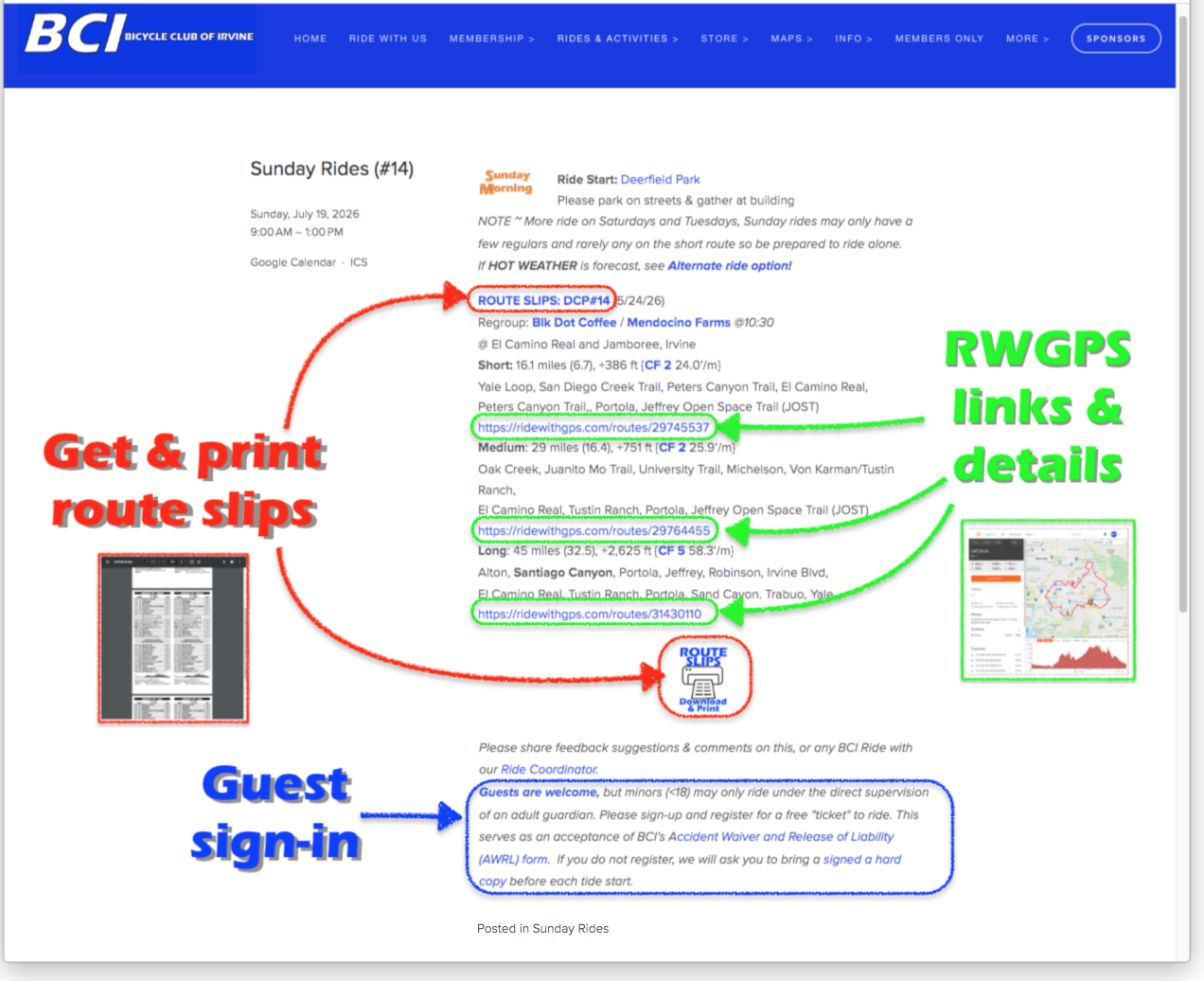
You CAN also access the route slip PDF from your smart phone at www.BikeIrvine.org..
You can also open the RideWithGPS data to check out the route, or even load & open the RideWithGPS app.
Guests / past members can also sign in on their phone just before a ride.
This system was implemented for the pandemic to make signing in as safe as possible. It works well; we no longer waste extra printed route slips or forms, or have lines to sign in before rides, so it has become our “New Normal”.

Everyone’s health, safety and fun continue to be the primary concerns of BCI.
If you want to see our history of Covid modifications see here.